SQLアンチパターンを最近になって読み始めたんですが、業務で困っていた問題にとても有効なんじゃないかと思うパターンが書いてあったのでご紹介します。
困っていた問題というのが、社内の部署を表すテーブルです。いわゆる木構造で、テーブルはcompany_id列とparent_id列をもっており、どこの会社で親部署はなんの部署かを1レコードが保持しています。
目次
環境
- PostgreSQL 13
- Rails 6.0
- Ruby 3.0
現状の問題
現在のテーブルは会社と部署のテーブルが2つあります。
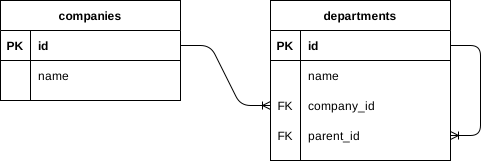
このスキーマで、ある部署配下の部署をすべて取得したいとか、最上位の親部署までをすべて取得したいといったユースケースを実現するには再帰処理が必要になります。
子部署をすべて取得
まず、部署IDをparent_idに指定して取得できるのは、直下の部署だけです。
SELECT
  departments.*
FROM
  departments
WHERE
departments.parent_id = ? -- 親部署IDとなると、標準的なSQLでナイーブな実装をしようとすると、いわゆるぐるぐる系の処理をすることになります。親部署から直下の子部署を取得して、それら子部署IDの配列をparent_idに指定して検索し、孫部署を取得して、以下ループするわけですね。
dept = Department.find(1) # 親部署
child_ids = Department.where(parent_id: dept.id).pluck(:id) # 子部署ID
if child_ids.present?
  g_child_ids = Department.where(parent_id: child_ids).pluck(:id) # 孫部署ID
  # ...
end
再帰関数にするとこんな感じになります。完全に嫌ですね。
def find_children(dept_ids, acc: [])
  child_ids = Department.where(parent_id: dept_ids).pluck(:id)

  if child_ids.present?
    find_children(child_ids, acc: acc + child_ids)
  else
    Department.where(id: acc)
  end
end

dept = Department.find(1) # 親部署
children = find_children([dept.id])
もうちょっとモデルっぽく書くとするとこんな感じになります。やっぱり好きになれそうにありませんね。
class Department < ApplicationRecord
  class << self
    def find_children(dept_ids, acc: [])
      child_ids = Department.where(parent_id: dept_ids).pluck(:id)

      if child_ids.present?
        find_children(child_ids, acc: acc + child_ids)
      else
        Department.where(id: acc)
      end
    end
  end

  def children
    Department.find_children([id])
  end
end

dept = Department.find(1) # 親部署
dept.children
再帰クエリー構文を使う
PostgreSQLのようにWITH句に対応したDBMSの場合だと、再帰クエリー構文が使えます。親部署配下のすべての子部署を取得するSQLはこんな感じになります。
WITH RECURSIVE department_tree (id, parent_id, name, level) AS (
  SELECT
    d.id,
    d.parent_id,
    d.name,
    1 AS level
  FROM
    departments d
  WHERE
    parent_id IS NULL
  UNION ALL
  SELECT
    dt.id,
    dt.parent_id,
    dt.name,
    dt.level + 1 AS level
  FROM
    department_tree dt
    INNER JOIN departments d ON d.parent_id = dt.id
)
SELECT * FROM department_tree WHERE parent_id = ? -- 親部署ID
さきほどの実装と比べるとSQLだけで再帰しており、rubyからでも使いやすそうな雰囲気が出てきました。
しかし、再帰処理だと実行計画がどうなるのか、複雑な検索条件と組み合わさった場合に検索速度が遅くなるんじゃないかという疑問が残ります。実際の業務で、この再帰クエリー構文を使った検索が1分を超えるような実行計画を採用してしまい、システムダウンにつながる事故がありました。これだとちょっと使いづらいですよね。
そうすると、テーブルの設計を見直した方が良さそうですね。
閉包テーブル (Closure Table)
そこで、SQLアンチパターンで紹介されていたのが、この閉包テーブルです。このテーブルは階層構造を保持します。

departmentsテーブルからparent_id列が消えて、代わりにdepartment_pathsテーブルに親ID・子ID列を持つようになりました。自分がどの部署の配下にいるのか、自分の配下にどの部署があるのかをレコードで持ちます。
具体的なデータを見てみましょう。
dept1 = Department.create!(name: '法人DX事業部')
dept1_1 = Department.create!(name: 'DX開発部')
dept1_1_1 = Department.create!(name: 'PMO')
dept1_1_2 = Department.create!(name: 'MLチーム')
dept1_1_3 = Department.create!(name: 'QAチーム')
dept1_1_4 = Department.create!(name: '第一開発グループ')
dept1_1_5 = Department.create!(name: '第二開発グループ')
dept1_2 = Department.create!(name: 'DX企画部')
dept1_2_1 = Department.create!(name: 'マーケティンググループ')
dept1_2_2 = Department.create!(name: '広報グループ')
dept1_3 = Department.create!(name: 'プロジェクト推進部')
dept1_4 = Department.create!(name: '東京営業部')
dept1_4_1 = Department.create!(name: '営業サポート')
これらの部署に対して、閉包テーブルのデータは次のようになります。
dept1 = Department.create!(name: '法人DX事業部')
DepartmentPath.create!(asc: dept1, desc: dept1)
dept1_1 = Department.create!(name: 'DX開発部')
DepartmentPath.create!(asc: dept1, desc: dept1_1)
DepartmentPath.create!(asc: dept1_1, desc: dept1_1)
dept1_1_1 = Department.create!(name: 'PMO')
DepartmentPath.create!(asc: dept1, desc: dept1_1_1)
DepartmentPath.create!(asc: dept1_1, desc: dept1_1_1)
DepartmentPath.create!(asc: dept1_1_1, desc: dept1_1_1)親部署との関係を表すレコード以外に、「自分は自分に所属している」というレコードも作っています。これにより、親から自分までの経路をすべて取得するのが非常に簡単になります。SQLはdesc_idを条件に指定するだけとなります。
SELECT
  *
FROM
  department_paths
WHERE
  desc_id = 3;
id | asc_id | desc_id
----+--------+---------
4 | 1 | 3
5 | 2 | 3
6 | 3 | 3
(3 rows)親から自分までの経路に属するそれぞれの部署名を取得するSQLも簡単です。だいぶ好きになれそうな感じがしてきましたね。
SELECT
  departments.name
FROM
  department_paths
  INNER JOIN departments ON departments.id = department_paths.asc_id
WHERE
  department_paths.desc_id = 3;
name
--------------
法人DX事業部
DX開発部
PMO
(3 rows)階層の順番も保持したい場合
上記の例では、たまたま順番通りに表示されていますが、親から順番に表示したいとか、逆に子から順番に表示したい場合には対応できません。もう一つdepth列を追加してみましょう。
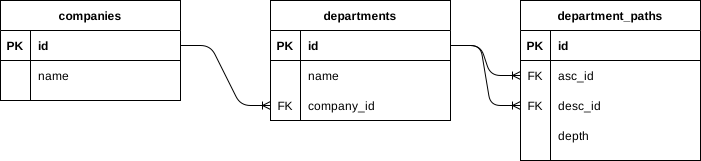
このdepth列はasc_idがどの階層にいるのかを表します。具体的なデータを見てみましょう。
dept1 = Department.create!(name: '法人DX事業部')
DepartmentPath.create!(asc: dept1, desc: dept1, depth: 1)
dept1_1 = Department.create!(name: 'DX開発部')
DepartmentPath.create!(asc: dept1, desc: dept1_1, depth: 1)
DepartmentPath.create!(asc: dept1_1, desc: dept1_1, depth: 2)
dept1_1_1 = Department.create!(name: 'PMO')
DepartmentPath.create!(asc: dept1, desc: dept1_1_1, depth: 1)
DepartmentPath.create!(asc: dept1_1, desc: dept1_1_1, depth: 2)
DepartmentPath.create!(asc: dept1_1_1, desc: dept1_1_1, depth: 3)desc_idを指定して検索すると、親->子の順番や子->親の順番を指定して、すべての親部署を取得できるようになりました。
SELECT
  *
FROM
  department_paths
WHERE
  desc_id = 3
ORDER BY
  depth ASC;
id | asc_id | desc_id | depth
----+--------+---------+-------
4 | 1 | 3 | 1
5 | 2 | 3 | 2
6 | 3 | 3 | 3
(3 rows)SELECT
*
FROM
department_paths
WHERE
desc_id = 3
ORDER BY
depth DESC; id | asc_id | desc_id | depth
----+--------+---------+-------
6 | 3 | 3 | 3
5 | 2 | 3 | 2
4 | 1 | 3 | 1
(3 rows)depth列を参照すると、自分がどの階層にいるのかも分かります。
SELECT
  *
FROM
  department_paths
WHERE
  asc_id = 2
  AND desc_id = 2;
id | asc_id | desc_id | depth
----+--------+---------+-------
3 | 2 | 2 | 2
(1 row)SELECT
*
FROM
department_paths
WHERE
asc_id = 3
AND desc_id = 3; id | asc_id | desc_id | depth
----+--------+---------+-------
6 | 3 | 3 | 3
(1 row)モデルの実装も非常に簡単です。
class DepartmentPath < ApplicationRecord
  belongs_to :asc, class_name: 'Department', foreign_key: 'asc_id'
  belongs_to :desc, class_name: 'Department', foreign_key: 'desc_id'

  scope :depth_order, -> { order(depth: :asc) }
  scope :self_path, -> { where('asc_id = desc_id') }
end
class Department < ApplicationRecord
has_many :parent_paths, class_name: 'DepartmentPath', foreign_key: 'desc_id'
has_many :child_paths, class_name: 'DepartmentPath', foreign_key: 'asc_id'
has_many :parents, -> { merge(DepartmentPath.depth_order) }, through: :parent_paths, source: 'asc'
has_many :children, through: :child_paths, source: 'desc'
# @return [Integer] Depth of the department
def depth
DepartmentPath.where(asc: self, desc: self).limit(1).pluck(:depth).first
end
endこのモデルの関連を使うと、これまで出てきたSQLを実行することができます。3階層目の部署を使ってモデルを操作してみましょう。まずは操作対象の部署を取得します。
irb(main):001:0> dept3 = Department.find(3)
  Department Load (0.4ms)  SELECT "departments".* FROM "departments" WHERE "departments"."id" = $1 LIMIT $2  [["id", 3], ["LIMIT", 1]]
=> #<Department:0x000055b4616c46a0 id: 3, name: "PMO">親から子順で、子部署のすべての親部署を知りたい場合にはDepartment.parent_pathsを使います。また、親部署モデルを取得する場合はDepartment.parentsを使います。
irb(main):002:0> DepartmentPath.where(desc: dept3)
  DepartmentPath Load (0.4ms)  SELECT "department_paths".* FROM "department_paths" WHERE "department_paths"."desc_id" = $1  [["desc_id", 3]]
=>
[#<DepartmentPath:0x000055b45fbbe1d0 id: 4, asc_id: 1, desc_id: 3, depth: 1>,
 #<DepartmentPath:0x000055b460794838 id: 5, asc_id: 2, desc_id: 3, depth: 2>,
 #<DepartmentPath:0x000055b4607946f8 id: 6, asc_id: 3, desc_id: 3, depth: 3>]

# dept3.parent_pathsはdepartment_paths.desc_idを指定したときと同じレコードが取得できています

irb(main):003:0> dept3.parent_paths
  DepartmentPath Load (0.3ms)  SELECT "department_paths".* FROM "department_paths" WHERE "department_paths"."desc_id" = $1  [["desc_id", 3]]
=>
[#<DepartmentPath:0x000055b46113d4c0 id: 4, asc_id: 1, desc_id: 3, depth: 1>,
 #<DepartmentPath:0x000055b46113d100 id: 5, asc_id: 2, desc_id: 3, depth: 2>,
 #<DepartmentPath:0x000055b46113d010 id: 6, asc_id: 3, desc_id: 3, depth: 3>]

# 部署モデルを取得したい場合

irb(main):004:0> dept3.parents
  Department Load (0.5ms)  SELECT "departments".* FROM "departments" INNER JOIN "department_paths" ON "departments"."id" = "department_paths"."asc_id" WHERE "department_paths"."desc_id" = $1 ORDER BY "department_paths"."depth" ASC  [["desc_id", 3]]
=> [#<Department:0x000055b4616f8130 id: 1, name: "法人DX事業部">, #<Department:0x000055b4616eece8 id: 2, name: "DX開発部">, #<Department:0x000055b4616ee838 id: 3, name: "PMO">]子から親順で、子部署のすべての親部署を知りたい場合はorderして逆順にします。
irb(main):005:0> dept3.parent_paths.order(depth: :desc)
  DepartmentPath Load (0.6ms)  SELECT "department_paths".* FROM "department_paths" WHERE "department_paths"."desc_id" = $1 ORDER BY "department_paths"."depth" DESC  [["desc_id", 3]]
=>
[#<DepartmentPath:0x000055b45ffc8d98 id: 6, asc_id: 3, desc_id: 3, depth: 3>,
 #<DepartmentPath:0x000055b45ffc8820 id: 5, asc_id: 2, desc_id: 3, depth: 2>,
#<DepartmentPath:0x000055b45ffc8208 id: 4, asc_id: 1, desc_id: 3, depth: 1>]この順番で親部署モデルを取得するにはちょっとめんどくさいですね。順番を知っているのはdepth列があるdepartment_pathsテーブルですが、取得したレコードはdepartmentsテーブルのレコードです。つまり、dept3.parentsで実行されるSQLと同様にINNER JOINしてORDER BY depthする必要があります。
SELECT
  departments.*
FROM
  departments
  INNER JOIN department_paths ON departments.id = department_paths.asc_id
WHERE
  department_paths.desc_id = ? -- 子部署ID
ORDER BY
department_paths.depth DESCモデルの操作はこのようになります。dept3.parentsとは違い、joins(:child_paths)を使うと期待したSQLが実行されます。
irb(main):006:0> Department.joins(:child_paths).merge(dept3.parent_paths.order(depth: :desc))
  Department Load (0.4ms)  SELECT "departments".* FROM "departments" INNER JOIN "department_paths" ON "department_paths"."asc_id" = "departments"."id" WHERE "department_paths"."desc_id" = $1 ORDER BY "department_paths"."depth" DESC  [["desc_id", 3]]
=> [#<Department:0x000055b4614006d0 id: 3, name: "PMO">, #<Department:0x000055b461400608 id: 2, name: "DX開発部">, #<Department:0x000055b4614003d8 id: 1, name: "法人DX事業部">]
子から親順をよく使う場合には、これもモデルのメソッドとして定義しておくとよいでしょう。
class Department < ApplicationRecord
  def parents_order_desc
    Department.joins(:child_paths).merge(parent_paths.order(depth: :desc))
  end
end
あるいは、こちらの順番がメインなのであれば、scopeを変更することになります。
class DepartmentPath < ApplicationRecord
  scope :depth_order, -> { order(depth: :desc) } # :asc -> :descに変更
end

class Department < ApplicationRecord
  has_many :parent_paths, autosave: false, class_name: 'DepartmentPath', foreign_key: 'desc_id'
  has_many :parents, -> { merge(DepartmentPath.depth_order) }, through: :parent_paths, source: 'asc' # 子から親順で取れるようになる
end部署の階層を知りたい場合は、DepartmentPath.self_pathを使います。
irb(main):007:0> DepartmentPath.self_path
  DepartmentPath Load (0.5ms)  SELECT "department_paths".* FROM "department_paths" WHERE (asc_id = desc_id)
=>
[#<DepartmentPath:0x000056388259bfd0 id: 1, asc_id: 1, desc_id: 1, depth: 1>,
 #<DepartmentPath:0x00005638826ad478 id: 3, asc_id: 2, desc_id: 2, depth: 2>,
 #<DepartmentPath:0x00005638826ad2c0 id: 6, asc_id: 3, desc_id: 3, depth: 3>,
 #<DepartmentPath:0x00005638826ad1a8 id: 9, asc_id: 4, desc_id: 4, depth: 3>,
 #<DepartmentPath:0x00005638826ad0b8 id: 12, asc_id: 5, desc_id: 5, depth: 3>,
 #<DepartmentPath:0x00005638826acf78 id: 15, asc_id: 6, desc_id: 6, depth: 3>,
 #<DepartmentPath:0x00005638826acd98 id: 18, asc_id: 7, desc_id: 7, depth: 3>,
 #<DepartmentPath:0x00005638826acc80 id: 20, asc_id: 8, desc_id: 8, depth: 2>,
 #<DepartmentPath:0x00005638826aca50 id: 23, asc_id: 9, desc_id: 9, depth: 3>,
 #<DepartmentPath:0x00005638826ac7f8 id: 26, asc_id: 10, desc_id: 10, depth: 3>,
 #<DepartmentPath:0x00005638826ac348 id: 28, asc_id: 11, desc_id: 11, depth: 2>,
 #<DepartmentPath:0x00005638826ac078 id: 30, asc_id: 12, desc_id: 12, depth: 2>,
#<DepartmentPath:0x000056388269ff08 id: 33, asc_id: 13, desc_id: 13, depth: 3>]自部署の階層を知りたい場合はDepartment#depthを使います。
irb(main):08:0> dept3.depth
   (0.2ms)  SELECT "department_paths"."depth" FROM "department_paths" WHERE "department_paths"."asc_id" = $1 AND "department_paths"."desc_id" = $2 LIMIT $3  [["asc_id", 3], ["desc_id", 3], ["LIMIT", 1]]
=> 3
一つ上の親部署を取得したい場合
すべての親部署を取得する場合は非常に簡単だったんですが、自部署の直接の親部署を取得する場合はどうなるでしょう?方法は複数ありますが、いくつか考えてみましょう。
self pathから取得する方法
自部署のパスからdepthを取得して、一つ上のdepthを検索する方法が考えられます。
class Department < ApplicationRecord
  has_many :parent_paths, autosave: false, class_name: 'DepartmentPath', foreign_key: 'desc_id'
  has_many :child_paths, autosave: false, class_name: 'DepartmentPath', foreign_key: 'asc_id'

  def parent_by_self_path
    parent_path = parent_paths.where(depth: DepartmentPath.where(asc: self, desc: self).select('depth - 1'))
    Department.joins(:child_paths).merge(parent_path).to_a.first
  end
end
この実装を実行すると、次のようなSQLが実行されます。「子部署ID = 3の親部署の中から、depthが自部署のdepth - 1となるような部署」を検索するSQLですね。
SELECT
  "departments".*
FROM
  "departments"
  INNER JOIN "department_paths" ON "department_paths"."asc_id" = "departments"."id"
WHERE
  "department_paths"."desc_id" = 3
  AND "department_paths"."depth" IN (
    SELECT
      depth - 1
    FROM
      "department_paths"
    WHERE
      "department_paths"."asc_id" = 3
      AND "department_paths"."desc_id" = 3
);depthの計算がサブクエリーになっているので、もし事前にdepthが分かっている場合にはもうちょっと速くできそうですね。
depthを指定して取得する方法
次は先にdepthを取得しておくパターンです。先ほどの実装からdepthの指定を変更しています。
class Department < ApplicationRecord
  has_many :parent_paths, autosave: false, class_name: 'DepartmentPath', foreign_key: 'desc_id'
  has_many :child_paths, autosave: false, class_name: 'DepartmentPath', foreign_key: 'asc_id'

  def depth
    DepartmentPath.where(asc: self, desc: self).limit(1).pluck(:depth).first
  end

  def parent_by_depth
    parent_path = parent_paths.where(depth: depth - 1)
    Department.joins(:child_paths).merge(parent_path).to_a.first
  end
endこのparent_by_depthを実行すると2つのSQLが実行されます。1つ目のSQLは自部署のdepthを取得しており、2つ目のSQLでそのdepthを使って親部署を検索しています。レコード数が多くなってくると、こちらの方が高速になる場合もあるかもしれません。
SELECT
  "department_paths"."depth"
FROM
  "department_paths"
WHERE
  "department_paths"."asc_id" = 3
  AND "department_paths"."desc_id" = 3
LIMIT
  1;

SELECT
  "departments".*
FROM
  "departments"
  INNER JOIN "department_paths" ON "department_paths"."asc_id" = "departments"."id"
WHERE
  "department_paths"."desc_id" = 3
AND "department_paths"."depth" = 2;同じSQLを生成する実装はもう一つあります。parentsの関連を使います。この場合は余計なORDER BYが発生しないようunscope(:order)しておく必要があります。
class Department < ApplicationRecord
  has_many :parents, -> { merge(DepartmentPath.depth_order) }, through: :parent_paths, source: 'asc'

  def depth
    DepartmentPath.where(asc: self, desc: self).limit(1).pluck(:depth).first
  end

  def parent_from_parents
    parents.merge(DepartmentPath.unscope(:order).where(depth: depth - 1)).to_a.first
  end
end
さて、ここまでは親部署の取得方法を考えてきました。次は子部署の取得方法を考えてみましょう。
子部署を取得したい場合
子部署の階層を指定して取得したい場合には、実装がちょっと大変になります。depth列は親部署の階層を表しているため、子部署の階層は列に無く、テーブルを結合しないといけません。
SELECT
  department_paths.*
FROM
  department_paths
WHERE
  department_paths.asc_id = 1 -- 最上位の部署
  AND department_paths.depth = 2; -- 一つ下の階層
実際、このSQLだとこんな結果になります。
 id | asc_id | desc_id | depth
----+--------+---------+-------
(0 rows)depth列は親部署(asc_id)の階層を表しているわけですから、最上位の部署でかつ2階層目のレコードは存在しないわけです。
SELECT
  department_paths.*
FROM
  department_paths
WHERE
  department_paths.asc_id = 1;
id | asc_id | desc_id | depth
----+--------+---------+-------
1 | 1 | 1 | 1
2 | 1 | 2 | 1
4 | 1 | 3 | 1
7 | 1 | 4 | 1
10 | 1 | 5 | 1
13 | 1 | 6 | 1
16 | 1 | 7 | 1
19 | 1 | 8 | 1
21 | 1 | 9 | 1
24 | 1 | 10 | 1
27 | 1 | 11 | 1
29 | 1 | 12 | 1
31 | 1 | 13 | 1
(13 rows)depthが1のレコードしかありませんね。つまり、子部署の階層は別テーブルから取得してこないといけないようです。では、親部署から見た子部署一覧のテーブルと、子部署の階層を表すテーブルを結合してみましょう。
SELECT
  asc_paths.asc_id,
  asc_paths.desc_id,
  asc_paths.depth AS asc_depth,
  desc_paths.depth AS desc_depth
FROM
  department_paths AS asc_paths -- 親部署から見た子部署一覧のテーブル
  INNER JOIN department_paths AS desc_paths -- 子部署の階層を表すテーブル
  ON asc_paths.desc_id = desc_paths.asc_id
WHERE
  asc_paths.asc_id = 1 -- 親部署ID
  AND desc_paths.asc_id = desc_paths.desc_id;
asc_id | desc_id | asc_depth | desc_depth
--------+---------+-----------+------------
1 | 1 | 1 | 1
1 | 2 | 1 | 2
1 | 3 | 1 | 3
1 | 4 | 1 | 3
1 | 5 | 1 | 3
1 | 6 | 1 | 3
1 | 7 | 1 | 3
1 | 8 | 1 | 2
1 | 9 | 1 | 3
1 | 10 | 1 | 3
1 | 11 | 1 | 2
1 | 12 | 1 | 2
1 | 13 | 1 | 3
(13 rows)この結果を使えば、指定した階層の子部署が取得できるようになりそうですね。2階層目の部署を取得するSQLはこうなります。
SELECT
  asc_paths.asc_id,
  asc_paths.desc_id,
  desc_paths.depth AS desc_depth
FROM
  department_paths AS asc_paths
  INNER JOIN department_paths AS desc_paths
  ON asc_paths.desc_id = desc_paths.asc_id
WHERE
  asc_paths.asc_id = 1
  AND desc_paths.asc_id = desc_paths.desc_id
  AND desc_paths.depth = 2;
asc_id | desc_id | desc_depth
--------+---------+------------
1 | 2 | 2
1 | 8 | 2
1 | 11 | 2
1 | 12 | 2
(4 rows)現時点の実装ではテーブル結合が発生するため、このクエリーが他の複雑な検索条件に含まれた場合のパフォーマンスが気になります。結合なしで検索できるような方法はないのでしょうか。
path_length列を追加する
SQLアンチパターンで紹介されていたのがpath_length列を追加する方法です。depth列は部署の絶対的な階層を表していたのに対し、path_length列は部署間の相対的な階層差を表します。つまり、これを使うと「2階層目から見たとき1階層下の部署」や「4階層目から見たとき1階層上の部署」といった相対的な階層の指定が簡単になります。
例えば、部署ID=1の直下の部署は次のようなSQLになります。
-- 修正前
SELECT
  asc_paths.asc_id,
  asc_paths.desc_id,
  desc_paths.depth AS desc_depth
FROM
  department_paths AS asc_paths
  INNER JOIN department_paths AS desc_paths
  ON asc_paths.desc_id = desc_paths.asc_id
WHERE
  asc_paths.asc_id = 1
  AND desc_paths.asc_id = desc_paths.desc_id
  AND desc_paths.depth = 2;
-- 修正後
SELECT
department_paths.*
FROM
department_paths
WHERE
asc_id = 1
AND path_length = 1; -- 2階層目の部署は1階層下 id | asc_id | desc_id | depth | path_length
----+--------+---------+-------+-------------
2 | 1 | 2 | 1 | 1
19 | 1 | 8 | 1 | 1
27 | 1 | 11 | 1 | 1
29 | 1 | 12 | 1 | 1
(4 rows)子部署の階層は、親部署の階層からどれだけ離れているかを計算すればいいので、もし子部署の階層を出したい場合は、SELECT句を変更します。
SELECT
  department_paths.asc_id,
  department_paths.desc_id,
  department_paths.depth + department_paths.path_length AS desc_depth
FROM
  department_paths
WHERE
  asc_id = 1
  AND path_length = 1;
asc_id | desc_id | desc_depth
--------+---------+------------
1 | 2 | 2
1 | 8 | 2
1 | 11 | 2
1 | 12 | 2
(4 rows)また、自部署のパスを表すSQLもpath_length = 0で表せるので、こうなります。
SELECT
  *
FROM
  department_paths
WHERE
  path_length = 0;
id | asc_id | desc_id | depth | path_length
----+--------+---------+-------+-------------
1 | 1 | 1 | 1 | 0
3 | 2 | 2 | 2 | 0
6 | 3 | 3 | 3 | 0
9 | 4 | 4 | 3 | 0
12 | 5 | 5 | 3 | 0
15 | 6 | 6 | 3 | 0
18 | 7 | 7 | 3 | 0
20 | 8 | 8 | 2 | 0
23 | 9 | 9 | 3 | 0
26 | 10 | 10 | 3 | 0
28 | 11 | 11 | 2 | 0
30 | 12 | 12 | 2 | 0
33 | 13 | 13 | 3 | 0
(13 rows)このpath_lengthを使うと、先述した一つ上の親部署を取得する実装も簡単になります。子部署のdepthを計算しなくてもよくなるため、サブクエリーがなくなります。
-- 修正前
SELECT
  "departments".*
FROM
  "departments"
  INNER JOIN "department_paths" ON "department_paths"."asc_id" = "departments"."id"
WHERE
  "department_paths"."desc_id" = 3
  AND "department_paths"."depth" IN (
    -- このサブクエリーが消える
    SELECT
      depth - 1
    FROM
      "department_paths"
    WHERE
      "department_paths"."asc_id" = 3
      AND "department_paths"."desc_id" = 3
  );
-- 修正後
SELECT
"departments".*
FROM
"departments"
INNER JOIN "department_paths" ON "department_paths"."asc_id" = "departments"."id"
WHERE
"department_paths"."desc_id" = 3
AND "department_paths"."path_length" = 1;最終的なテーブルとモデル
部署構造の実装で抱えていた問題を解消すべく、閉包テーブルの導入を検討してみました。最終的なテーブルとモデルは次のようになります。
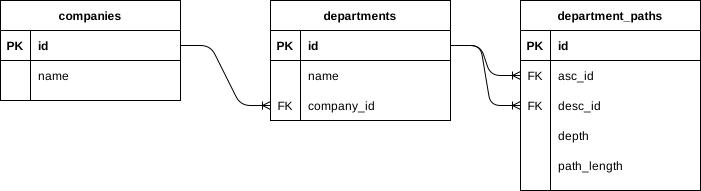
class CreateDepartments < ActiveRecord::Migration[6.1]
  def change
    create_table :companies do |t|
      t.string :name, null: false
    end

    create_table :departments do |t|
      t.references :company, foreign_key: true, null: false
      t.string :name, null: false
    end

    # primary_key: [desc_id, :asc_id]でもいいかも
    create_table :department_paths do |t|
      t.bigint :asc_id, null: false
      t.bigint :desc_id, null: false
      t.integer :depth, null: false
      t.integer :path_length, null: false
    end

    add_foreign_key :department_paths, :departments, column: :asc_id
    add_foreign_key :department_paths, :departments, column: :desc_id

    # 組み合わせが重複してはいけないので一意制約を入れる
    add_index :department_paths, [:desc_id, :asc_id], unique: true

    # TODO: index検討する
    # add_index :department_paths, [:path_length, :desc_id]
    # add_index :department_paths, [:asc_id, :path_length]
  end
end
class Company < ApplicationRecord
has_many :departments
endclass DepartmentPath < ApplicationRecord
belongs_to :asc, class_name: 'Department', foreign_key: 'asc_id'
belongs_to :desc, class_name: 'Department', foreign_key: 'desc_id'
scope :depth_order, -> { order(depth: :asc) }
scope :self_path, -> { where('path_length = 0') }
endclass Department < ApplicationRecord
belongs_to :company
has_many :parent_paths, autosave: false, class_name: 'DepartmentPath', foreign_key: 'desc_id'
has_many :child_paths, autosave: false, class_name: 'DepartmentPath', foreign_key: 'asc_id'
has_many :parents, -> { merge(DepartmentPath.depth_order) }, through: :parent_paths, source: 'asc'
has_many :children, through: :child_paths, source: 'desc'
# @return [Department::ActiveRecord_Relation]
def parents_order_desc
Department.joins(:child_paths).merge(parent_paths.reorder(depth: :desc))
end
# @return [Integer] Depth of the department
def depth
DepartmentPath.where(asc: self, desc: self).limit(1).pluck(:depth).first
end
# @return [Department] The parent department
def parent
Department.joins(:child_paths).merge(parent_paths.where(path_length: 1)).to_a.first
end
endcompany = Company.create!(name: 'マッスルコンサルティング')
dept1 = Department.create!(company: company, name: '法人DX事業部')
DepartmentPath.create!(asc: dept1, desc: dept1, depth: 1, path_length: 0)
dept1_1 = Department.create!(company: company, name: 'DX開発部')
DepartmentPath.create!(asc: dept1, desc: dept1_1, depth: 1, path_length: 1)
DepartmentPath.create!(asc: dept1_1, desc: dept1_1, depth: 2, path_length: 0)
dept1_1_1 = Department.create!(company: company, name: 'PMO')
DepartmentPath.create!(asc: dept1, desc: dept1_1_1, depth: 1, path_length: 2)
DepartmentPath.create!(asc: dept1_1, desc: dept1_1_1, depth: 2, path_length: 1)
DepartmentPath.create!(asc: dept1_1_1, desc: dept1_1_1, depth: 3, path_length: 0)
dept1_1_2 = Department.create!(company: company, name: 'MLチーム')
DepartmentPath.create!(asc: dept1, desc: dept1_1_2, depth: 1, path_length: 2)
DepartmentPath.create!(asc: dept1_1, desc: dept1_1_2, depth: 2, path_length: 1)
DepartmentPath.create!(asc: dept1_1_2, desc: dept1_1_2, depth: 3, path_length: 0)
dept1_1_3 = Department.create!(company: company, name: 'QAチーム')
DepartmentPath.create!(asc: dept1, desc: dept1_1_3, depth: 1, path_length: 2)
DepartmentPath.create!(asc: dept1_1, desc: dept1_1_3, depth: 2, path_length: 1)
DepartmentPath.create!(asc: dept1_1_3, desc: dept1_1_3, depth: 3, path_length: 0)
dept1_1_4 = Department.create!(company: company, name: '第一開発グループ')
DepartmentPath.create!(asc: dept1, desc: dept1_1_4, depth: 1, path_length: 2)
DepartmentPath.create!(asc: dept1_1, desc: dept1_1_4, depth: 2, path_length: 1)
DepartmentPath.create!(asc: dept1_1_4, desc: dept1_1_4, depth: 3, path_length: 0)
dept1_1_5 = Department.create!(company: company, name: '第二開発グループ')
DepartmentPath.create!(asc: dept1, desc: dept1_1_5, depth: 1, path_length: 2)
DepartmentPath.create!(asc: dept1_1, desc: dept1_1_5, depth: 2, path_length: 1)
DepartmentPath.create!(asc: dept1_1_5, desc: dept1_1_5, depth: 3, path_length: 0)
dept1_2 = Department.create!(company: company, name: 'DX企画部')
DepartmentPath.create!(asc: dept1, desc: dept1_2, depth: 1, path_length: 1)
DepartmentPath.create!(asc: dept1_2, desc: dept1_2, depth: 2, path_length: 0)
dept1_2_1 = Department.create!(company: company, name: 'マーケティンググループ')
DepartmentPath.create!(asc: dept1, desc: dept1_2_1, depth: 1, path_length: 2)
DepartmentPath.create!(asc: dept1_2, desc: dept1_2_1, depth: 2, path_length: 1)
DepartmentPath.create!(asc: dept1_2_1, desc: dept1_2_1, depth: 3, path_length: 0)
dept1_2_2 = Department.create!(company: company, name: '広報グループ')
DepartmentPath.create!(asc: dept1, desc: dept1_2_2, depth: 1, path_length: 2)
DepartmentPath.create!(asc: dept1_2, desc: dept1_2_2, depth: 2, path_length: 1)
DepartmentPath.create!(asc: dept1_2_2, desc: dept1_2_2, depth: 3, path_length: 0)
dept1_3 = Department.create!(company: company, name: 'プロジェクト推進部')
DepartmentPath.create!(asc: dept1, desc: dept1_3, depth: 1, path_length: 1)
DepartmentPath.create!(asc: dept1_3, desc: dept1_3, depth: 2, path_length: 0)
dept1_4 = Department.create!(company: company, name: '東京営業部')
DepartmentPath.create!(asc: dept1, desc: dept1_4, depth: 1, path_length: 1)d
DepartmentPath.create!(asc: dept1_4, desc: dept1_4, depth: 2, path_length: 0)
dept1_4_1 = Department.create!(company: company, name: '営業サポート')
DepartmentPath.create!(asc: dept1, desc: dept1_4_1, depth: 1, path_length: 2)
DepartmentPath.create!(asc: dept1_4, desc: dept1_4_1, depth: 2, path_length: 1)
DepartmentPath.create!(asc: dept1_4_1, desc: dept1_4_1, depth: 3, path_length: 0)今回は参照系の実装について考えてきましたが、次回は更新系について考えてみたいと思います。
おすすめの書籍
SQLの高速化、スロークエリーのチューニングなど、実際の業務で役に立つ実践的な知識が体系的にまとまっているおすすめの書籍です。ネットの記事ではよく見かけるけど、ちゃんと読んだことないな、しっかり勉強しておきたいなと思っている方に特におすすめの書籍となっています。


達人に学ぶSQL徹底指南書 第2版 初級者で終わりたくないあなたへ


都内で働くweb開発者です!エンジニアらしく効率的に筋肉を大きくしたいです!
